BSS Attendant Workflow - Enhanced Workflow-Centric View
Document Purpose: Define the complete attendant-assisted battery swap workflow from the station attendant's operational perspective, ensuring a coherent, visually obvious process that guides the attendant through each step of serving a customer.
Primary Focus: Attendant's activities, form interactions, and operational decisions
Rider Context: Included only where rider actions directly impact attendant workflow (e.g., presenting QR code, making payment, receiving battery). For complete rider experience across all BSS workflows, see bss-rider-workflow.md.
Scenario Context: - Rider: Has an active subscription account - Service Type: Basic period subscription with Swap-Count and Electricity-Fuel bundle - Visit Type: Swap (or first issuance) of battery - Product Bundle: Swap-Count quota + Electricity-Fuel quota
Visual Workflow Diagrams
Two complementary diagrams illustrate this workflow from the attendant's operational perspective:
Activity Diagram (Attendant & Rider Interaction)
Attendant & Rider Combined View:
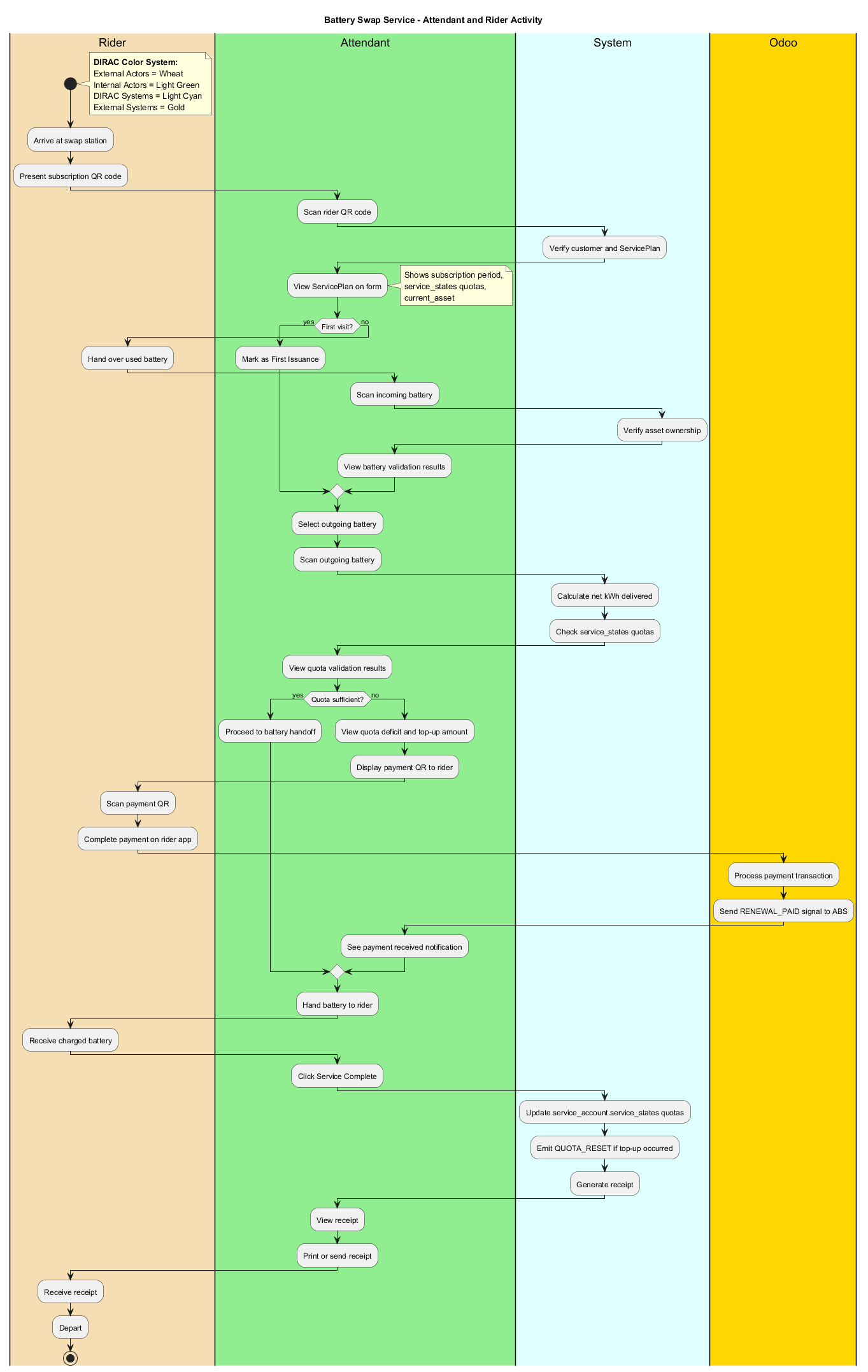
Shows the complete workflow with both attendant and rider actions in swimlanes. Focuses on what each actor does and sees at interaction touchpoints, with minimal system orchestration details.
Note: For the rider's standalone experience across all BSS workflows (Service Discovery, Intent Signaling, Location Auth, Swap Execution, Transaction Finalization), see the rider-only activity diagram in
bss-rider-workflow.md.
Sequence Diagram (System Orchestration Focus)
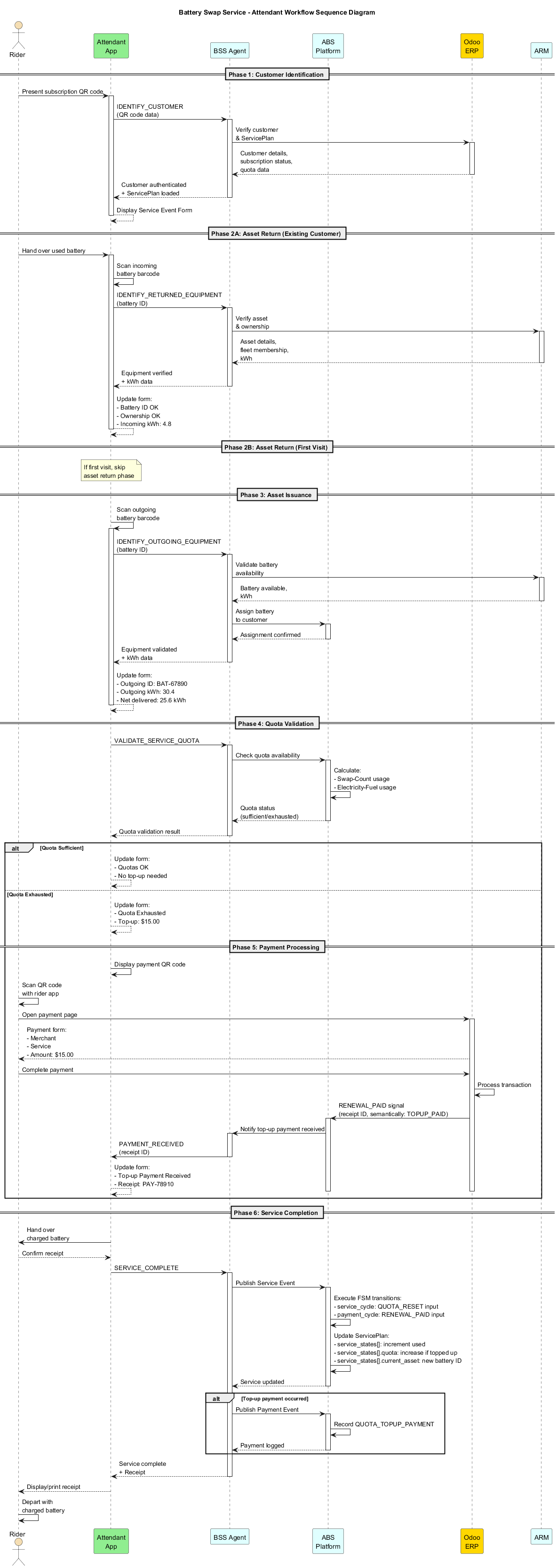
Shows the complete technical orchestration between Attendant App, BSS Agent, ABS Platform, Odoo, and ARM. This diagram reveals the behind-the-scenes message flows, API calls, and system interactions that support the user experience shown in the activity diagrams.
Color Coordination: All diagrams follow the DIRAC Color System: - Wheat = External actors (Riders) - Light Green = Internal actors (Attendants, Staff) - Light Cyan = Core DIRAC systems (ABS, ARM, BSS Agent) - Gold = External systems (Odoo ERP) - Light Gray = Physical assets/infrastructure
Understanding Renewal vs. Top-up: Terminology Clarification
The Car Rental / Hotel Booking Analogy
To understand the BSS subscription model, think of it like a car rental with prepaid fuel or a hotel booking with meal coupons:
Car Rental Analogy: - Subscription Period = Rental contract (Jan 1 - Jan 7, fixed duration) - Included Quota = Prepaid fuel allowance (e.g., 500 km worth of fuel) - Quota Exhaustion = Used all 500 km of prepaid fuel on Day 3 - Top-up = Buy additional fuel credits to continue driving (rental still ends Jan 7) - Contract End = Return car on Jan 7, regardless of fuel credits remaining
Hotel Booking Analogy: - Subscription Period = Room booking (3 nights, fixed checkout date) - Included Quota = Meal coupons (e.g., 6 meal vouchers included) - Quota Exhaustion = Used all 6 meal vouchers on Day 2 - Top-up = Purchase additional meal coupons (checkout date unchanged) - Booking End = Check out on Day 3, regardless of unused meal coupons
Key Architectural Concepts
1. Subscription = Time-Bound Entitlement
- Controls WHEN services are accessible (
subscription_starttosubscription_end) - Like a club membership or hotel room booking
- Fixed duration - does not extend when quotas are topped up
- When subscription expires, customer must purchase a NEW subscription (not renew existing one)
2. Service Quotas = Prepaid Usage Allowances
- Controls HOW MUCH of each service can be consumed
- Tracked per service in
service_account.service_states[]:service_states: [ { service_id: 'svc-battery-fleet-kenya', used: 0, quota: 10 }, // 10 swaps included { service_id: 'svc-electricity-fuel-kenya', used: 0, quota: 400 } // 400 kWh included ] - Think: Prepaid fuel credits, meal vouchers, spa treatment packages
- Independent of subscription duration
3. Top-up = Replenishing Quota (Not Extending Time)
- What it does: Increases
service_states[].quotafor specific service - What it does NOT do: Extend
subscription_enddate - Payment nature: Incidental, like room service or buying fuel
- Example:
Subscription: Jan 1 - Dec 31 (365 days)
Initial quota: 10 battery swaps
June 15: Quota exhausted (10/10 used)
Customer pays top-up: $15 for 5 extra swaps
Result:
  - Quota becomes 15 swaps (10 + 5)
  - Subscription still ends Dec 31 (unchanged)
  - Customer can continue swapping until Dec 31 OR 15 swaps, whichever comes first
FSM Terminology: Historical Context and Expedient Design
The "RENEWAL_DUE" Misnomer
In the current FSM implementation (payment_cycle), the state RENEWAL_DUE is used for both subscription renewals AND quota top-ups. This is intentionally expedient terminology for codebase stability:
Why the confusing name? 1. Historical design: Early model assumed renewable subscriptions 2. Current business model: Fixed-term subscriptions only (no renewals) 3. Semantic shift: "RENEWAL_DUE" now means "payment is due" (generic) 4. Actual usage: Always triggered by quota exhaustion, never by subscription renewal
Correct interpretation:
- FSM state name: RENEWAL_DUE
- Semantic meaning: TOPUP_DUE (quota replenishment payment required)
- FSM input name: RENEWAL_PAID
- Semantic meaning: TOPUP_PAID (quota top-up payment received)
Why not fix it now? - Codebase stability: FSM definitions are foundational, changes ripple across system - Version-based design: Next model version (v2) can use corrected terminology - Functional correctness: Current FSM works correctly despite misleading names - Developer clarity: This documentation resolves ambiguity without code changes
FSM Flow with Correct Semantic Interpretation
Scenario: Rider exhausts swap quota during active subscription

payment_cycle FSM:
  CURRENT (subscription valid: Jan 1 - Dec 31)
    ↓ [QUOTA_EXHAUSTED signal from service layer]
  RENEWAL_DUE  ← Read as: "TOPUP_DUE" (payment needed to replenish quota)
    ↓ [RENEWAL_PAID input from Odoo]
  CURRENT  ← Read as: "TOPUP_PAID" (quota replenished, subscription_end unchanged)

service_cycle FSM:
  WAIT_BATTERY_SWAP
    ↓ [Agent detects quota limit: service_states[].used >= quota]
  SUSPENDED (service blocked until quota topped up)
    ↓ [QUOTA_RESET input after top-up payment]
  WAIT_BATTERY_SWAP (service restored)

ServicePlan updates:
  - subscription_end: UNCHANGED (still Dec 31)
  - service_states[].quota: INCREASED (e.g., 10 → 15)
  - service_states[].used: Continues incrementing from current value
What Happens When Subscription Expires?
Fixed-Term Model (Current Design):
Dec 31: subscription_end date passes
  ↓ [SUBSCRIPTION_EXPIRED signal]
service_cycle: WAIT_BATTERY_SWAP → SUSPENDED
payment_cycle: CURRENT → RENEWAL_DUE (semantically: "final settlement")
  ↓ [Asset return and final payment]
Both FSMs: → COMPLETE

Customer wants to continue?
  → Must purchase NEW subscription (new ServicePlan instance)
  → Previous subscription DOES NOT renew/extend
Why no renewals? - Simpler FSM logic (no date extension calculations) - Cleaner business model (new contract = new ServicePlan) - Supports future pricing changes (new subscription = new pricing) - Version-based architecture enables full model redesign in v2
Developer Guidance
When you see RENEWAL_DUE in code:
- ✅ Think: "Payment is needed to continue service"
- ✅ Check context: Triggered by QUOTA_EXHAUSTED (not subscription end)
- ✅ Agent determines: Which service quota, how much to top up
- ❌ Do NOT assume: Subscription is being renewed/extended
When implementing top-up payments:
1. Detect quota exhaustion: service_states[].used >= quota
2. Emit QUOTA_EXHAUSTED signal → triggers payment_cycle transition to RENEWAL_DUE
3. Calculate top-up amount based on business rules
4. Display payment QR to customer
5. Receive payment confirmation from Odoo
6. Update service_states[].quota (increase by top-up amount)
7. Emit QUOTA_RESET signal → restores service_cycle to WAIT_BATTERY_SWAP
8. Do NOT modify subscription_end date
Future versions:
- Model v2 may use corrected FSM terminology (TOPUP_DUE, TOPUP_PAID)
- Version-based design allows complete FSM redesign without breaking v1
- This expedient terminology is isolated to v1 implementation
Workflow Vision: Attendant's Perspective
The attendant handles a single, unified Service Event form that guides them through the entire transaction, with clear steps, real-time status updates, and validation feedback at each stage.
Step-by-Step Workflow Table
| Step | Action | Attendant Activity | System Response | Form Updates | Next Action |
|---|---|---|---|---|---|
| 1 | Customer Arrives | Rider presents QR code | - | Attendant app ready | Scan QR code |
| 2 | Scan Customer QR | Scan rider's subscription QR code | • Verify customer & ServicePlan via Odoo • Load ServicePlan details • Identify subscription type, dates, quotas |
Form Displays: • Customer ID • Subscription type • Start/End dates • Days remaining • Swap-Count quota (used/limit) • Electricity-Fuel quota (used/limit) • Expected incoming battery (or "First Visit") • Payment status (CURRENT/OVERDUE) |
Proceed to battery return |
| 3 | Asset Return Step | Scan incoming battery barcode | • Validate battery ID • Verify ownership (matches expected) • Check battery condition • Read electricity charge (SOC%) |
Form Updates: • Incoming battery ID: BAT-12345 • Ownership: ✅ Verified • Condition: ✅ Acceptable • Electricity remaining: 15% SOC • Status: ✅ Asset Return Accepted |
Move to asset issuance |
| 3a | First Visit (No Return) | Indicate no battery to return | • System recognizes first visit • Expected battery = null |
Form Updates: • Incoming battery: None (First Visit) • Status: ✅ First Issuance Mode |
Move to asset issuance |
| 4 | Asset Issuance Step | Scan outgoing battery barcode | • Validate battery availability • Assign battery to customer • Read electricity charge (SOC%) |
Form Updates: • Outgoing battery ID: BAT-67890 • Electricity charged: 95% SOC • Net electricity delivered: 80% (95% - 15%) • Asset Status: ✅ Ready for Checkout |
Calculate quota consumption |
| 5 | Quota Validation | System auto-calculates | • Check Swap-Count quota (1 swap) • Check Electricity-Fuel quota (80% SOC units) • Calculate total quota consumption • Determine if quotas sufficient |
Form Updates: • Swap-Count: 5 used → 6 used (limit: 10) ✅ • Electricity-Fuel: 320 kWh used → 344 kWh used (limit: 400 kWh) ✅ • Quota Status: ✅ Sufficient • Top-up Required: No |
Check payment status |
| 5a | Quota Exhausted Scenario | System detects exhaustion | • Swap-Count or Electricity quota exhausted • Calculate top-up amount needed |
Form Updates: • Quota Status: ❌ Exhausted • Swap-Count deficit: 1 swap • Electricity deficit: 30 kWh • Top-up Required: $15.00 • Payment Due: $15.00 |
Proceed to payment |
| 6 | Payment Requirement | Review total amount due | • Calculate net payment: - Base subscription: Paid - Top-up charges: $15.00 - Total Due: $15.00 |
Form Displays: • Amount Due: $15.00 • Merchant: Station XYZ • Service: Swap + Electricity Top-up • Payment QR Code (visible) |
Instruct rider to pay |
| 7 | Rider Payment | Display payment QR on attendant phone | • QR redirects rider to Odoo payment page • Rider completes payment on their app • Odoo processes payment • Odoo confirms to ABS platform |
Form Updates: • Payment Status: ⏳ Awaiting... • (After payment) • Payment Status: ✅ Payment Received • Receipt ID: PAY-78910 |
Release battery |
| 8 | Release Outgoing Battery | Hand battery to rider | Physical handoff | Attendant confirms handoff | Click "Service Complete" |
| 9 | Service Complete | Click "Service Complete" button | • Publish Service Event signal • Publish Payment Event signal • Update FSM states: - service_cycle: BATTERY_RETURNED → BATTERY_ISSUED - payment_cycle: CURRENT (or RENEWAL_DUE) • Update ServicePlan quotas: - Swap-Count: +1 used - Electricity-Fuel: +80% used - current_asset: BAT-67890 |
Form Updates: • Service Status: ✅ Complete • FSM State: BATTERY_ISSUED • Updated Quotas Displayed • Transaction Receipt Generated |
End transaction |
| 10 | Receipt & Confirmation | Print/send receipt to rider | • Receipt includes: - Transaction ID - Batteries swapped - Quotas remaining - Payment confirmation - Next service date |
Receipt displayed/printed | Rider departs |
Critical Workflow Elements
1. Service Event Form Structure
The attendant interface presents a single, persistent form that updates in real-time as the workflow progresses:
╔════════════════════════════════════════════════════════════════╗
║               BATTERY SWAP SERVICE EVENT                        ║
║  Customer: John Doe (#CUST-12345)                              ║
║  Service Plan: Weekly Freedom Nairobi - Basic                  ║
╠════════════════════════════════════════════════════════════════╣
║  📅 SUBSCRIPTION STATUS                                        ║
║  ├─ Type: Period Subscription (Weekly)                         ║
║  ├─ Start Date: 2025-01-01                                     ║
║  ├─ End Date: 2025-12-31                                       ║
║  └─ Days Remaining: 342 days                                   ║
╠════════════════════════════════════════════════════════════════╣
║  📊 QUOTA STATUS                                               ║
║  ├─ Swap-Count: 6 / 10 (4 remaining) ✅                        ║
║  ├─ Electricity-Fuel: 344 kWh / 400 kWh (56 kWh remaining) ✅  ║
║  └─ Payment Status: CURRENT ✅                                 ║
╠════════════════════════════════════════════════════════════════╣
║  🔋 ASSET RETURN (Step 3 of 6)                                 ║
║  ├─ Expected Battery: BAT-12345                                ║
║  ├─ Scanned Battery: BAT-12345 ✅                              ║
║  ├─ Ownership: Verified ✅                                     ║
║  ├─ Condition: Acceptable ✅                                   ║
║  └─ Incoming Electricity: 15% SOC (4.8 kWh)                    ║
╠════════════════════════════════════════════════════════════════╣
║  ⚡ ASSET ISSUANCE (Step 4 of 6)                               ║
║  ├─ Outgoing Battery: BAT-67890 ✅                             ║
║  ├─ Outgoing Electricity: 95% SOC (30.4 kWh)                   ║
║  └─ Net Electricity Delivered: 80% (25.6 kWh)                  ║
╠════════════════════════════════════════════════════════════════╣
║  💰 PAYMENT (Step 5 of 6)                                      ║
║  ├─ Subscription Fee: $0.00 (Paid)                             ║
║  ├─ Top-up Required: $15.00                                    ║
║  ├─ Total Due: $15.00                                          ║
║  ├─ Payment QR: [QR CODE IMAGE]                                ║
║  └─ Payment Status: ⏳ Awaiting Payment...                     ║
╠════════════════════════════════════════════════════════════════╣
║  [🔄 Refresh Status]  [✅ Service Complete]  [❌ Cancel]       ║
╚════════════════════════════════════════════════════════════════╝
2. Electricity Tracking Model
Assumption: Each battery has a State of Charge (SOC%) that represents electricity content.
- Incoming Battery SOC: Scanned/read from battery management system (BMS)
- Outgoing Battery SOC: Pre-charged level (e.g., 95% SOC)
- Net Electricity Delivered:
Outgoing SOC - Incoming SOC - Electricity Quota Consumption: Deduct net delivered electricity from quota
Example: - Incoming: 15% SOC = 4.8 kWh (32 kWh battery capacity) - Outgoing: 95% SOC = 30.4 kWh - Net Delivered: 25.6 kWh → deduct from Electricity-Fuel quota
3. Payment Flow Integration
Payment QR Code Workflow:
- Attendant Phone Display: Shows payment QR code on screen
- Rider Scans QR: Opens Odoo payment page in rider's app
- Payment Page Shows:
- Merchant: Station XYZ (attendant's station)
- Service Description: "Battery Swap + Electricity Top-up"
- Amount: $15.00
- Payment Methods: Mobile Money, Card, etc.
- Rider Completes Payment: Confirms transaction
- Odoo Processes: Validates payment, updates ABS platform
- ABS Notifies Attendant: Payment received confirmation appears on form
- Attendant Releases Battery: Proceeds to service completion
MQTT Integration:
- Odoo → ABS: emit/odoo/payment/plan/{plan_id}/payment_confirmed
- ABS → UXI: echo/abs/attendant/plan/{plan_id}/payment_received
4. Service Event & Payment Event Signals
When attendant clicks "Service Complete":
Service Event Signal:
{
  "event_type": "BATTERY_SWAP_COMPLETED",
  "plan_id": "bss-plan-weekly-freedom-nairobi-v2-plan1",
  "timestamp": "2025-01-15T10:30:00Z",
  "service_data": {
    "incoming_battery_id": "BAT-12345",
    "incoming_soc_percent": 15,
    "outgoing_battery_id": "BAT-67890",
    "outgoing_soc_percent": 95,
    "net_electricity_kwh": 25.6,
    "swap_count_increment": 1
  },
  "fsm_inputs": [
    {
      "cycle": "service_cycle",
      "input": "BATTERY_ISSUED"
    }
  ]
}
Payment Event Signal (if top-up occurred):
{
  "event_type": "QUOTA_TOPUP_PAYMENT",
  "plan_id": "bss-plan-weekly-freedom-nairobi-v2-plan1",
  "timestamp": "2025-01-15T10:25:00Z",
  "payment_data": {
    "amount": 15.00,
    "currency": "USD",
    "payment_method": "MOBILE_MONEY",
    "odoo_receipt_id": "PAY-78910",
    "service_description": "Quota Top-up: Battery Swaps"
  },
  "quota_updates": {
    "service_id": "svc-battery-fleet-kenya-premium",
    "quota_before": 10,
    "quota_after": 15,
    "top_up_amount": 5
  },
  "subscription_impact": {
    "subscription_end": "2025-12-31",
    "note": "Top-up payment does NOT extend subscription period"
  },
  "fsm_inputs": [
    {
      "cycle": "payment_cycle",
      "input": "RENEWAL_PAID",
      "semantic_note": "Read as TOPUP_PAID - quota replenishment payment received"
    },
    {
      "cycle": "service_cycle",
      "input": "QUOTA_RESET",
      "note": "Restores service from SUSPENDED to WAIT_BATTERY_SWAP"
    }
  ]
}
ABS Platform Updates:
- ServicePlan Record:
- serviceState: BATTERY_RETURNED → BATTERY_ISSUED
- serviceStates[0].used: 6 (Swap-Count +1)
- serviceStates[0].current_asset: BAT-67890
- serviceStates[1].used: 344 kWh (Electricity +25.6 kWh)
- Payment Record: New payment activity logged in Odoo
Workflow State Transitions
FSM State Flow (Normal Swap with Sufficient Quota)
Service Cycle FSM:
WAIT_BATTERY_SWAP (customer has battery, quotas available)
    ↓ [Swap event occurs, quotas decremented]
WAIT_BATTERY_SWAP (remains in same state, ready for next swap)
Payment Cycle FSM:
CURRENT (subscription valid, quotas available)
    ↓ [No FSM transition during normal swaps]
CURRENT (remains in same state)
Note: Normal battery swaps do NOT trigger FSM state changes. The service remains in WAIT_BATTERY_SWAP state, and quotas are simply decremented (service_states[].used incremented).
FSM State Flow (Quota Exhaustion + Top-up)
Service Cycle FSM:
WAIT_BATTERY_SWAP
    ↓ [Agent detects: service_states[].used >= quota]
    ↓ [Emits QUOTA_EXHAUSTED signal]
SUSPENDED (service blocked until quota replenished)
    ↓ [QUOTA_RESET input - after top-up payment processed]
WAIT_BATTERY_SWAP (service restored, quota increased)
Payment Cycle FSM:
CURRENT (subscription valid: Jan 1 - Dec 31)
    ↓ [QUOTA_EXHAUSTED input - weak coupling signal from service layer]
RENEWAL_DUE (semantically: TOPUP_DUE - payment required to replenish quota)
    ↓ [RENEWAL_PAID input - semantically: TOPUP_PAID]
CURRENT (quota replenished, subscription_end UNCHANGED)
ServicePlan Updates After Top-up:
- subscription_end: UNCHANGED (e.g., still Dec 31)
- service_account.service_states[]:
- Find exhausted service by service_id
- Increase quota by top-up amount (e.g., 10 → 15)
- used continues from current value (e.g., 10)
- payment_account: Top-up payment recorded as incidental transaction
Key Points:
- FSM state RENEWAL_DUE should be read as TOPUP_DUE (expedient terminology)
- FSM input RENEWAL_PAID should be read as TOPUP_PAID (expedient terminology)
- QUOTA_EXHAUSTED signal is generic - FSM doesn't know which service or amount
- Agent layer determines specifics and calculates top-up cost
- Subscription duration is NEVER extended by top-ups
FSM State Flow (Subscription Expiration - Service Ends)
Service Cycle FSM:
WAIT_BATTERY_SWAP
    ↓ [SUBSCRIPTION_EXPIRED input - subscription_end date passed]
SUSPENDED (service blocked - membership expired)
    ↓ [GRACE_PERIOD_OVER input - if applicable]
WAIT_BATTERY_RETURN (asset return required)
    ↓ [BATTERY_RETURNED input]
COMPLETE (subscription concluded)
Payment Cycle FSM:
CURRENT (subscription active)
    ↓ [SUBSCRIPTION_EXPIRED input]
RENEWAL_DUE (semantically: final settlement or new subscription purchase)
    ↓ [FINAL_PAYMENT_PAID input - if applicable]
COMPLETE (subscription concluded)
What Happens Next:
- Previous ServicePlan: Transitions to COMPLETE state (ended)
- Customer wants to continue: Must purchase NEW subscription
- New subscription: Creates new ServicePlan instance with:
- New subscription_start and subscription_end dates
- Fresh quota allocations in service_states[]
- New contract terms (may have different pricing)
- Important: Old subscription does NOT renew or extend
Business Rationale: - Fixed-term model simplifies FSM logic (no date calculations) - New subscription = new contract = supports pricing changes - Cleaner separation between subscription periods - Version-based architecture allows future model redesign
Error Handling & Edge Cases
| Scenario | Detection Point | Attendant Action | System Response |
|---|---|---|---|
| Wrong Battery Scanned | Step 3 (Asset Return) | Re-scan correct battery | Form shows: ❌ Battery mismatch. Expected: BAT-12345, Got: BAT-99999 |
| Damaged Battery | Step 3 (Condition Check) | Mark condition as damaged | Form shows: ⚠️ Damage assessment required. Proceed to damage form. |
| Quota Exhausted | Step 5 (Quota Validation) | Inform rider of top-up | Form updates with top-up amount, displays payment QR |
| Payment Timeout | Step 7 (Awaiting Payment) | Retry or cancel | Form shows: ⏰ Payment timeout. Retry? [Yes] [Cancel Service] |
| Payment Failed | Step 7 (Payment Processing) | Retry payment or cancel | Form shows: ❌ Payment declined. Retry? [Yes] [Cancel Service] |
| First Visit (No Return) | Step 2 (Load ServicePlan) | Skip Step 3 (Asset Return) | Form hides "Asset Return" section, proceeds to issuance |
| Subscription Expired | Step 2 (Load ServicePlan) | Inform rider, offer renewal | Form shows: ❌ Subscription expired. Renewal required. |
| Service Suspended | Step 2 (Validate Customer) | Block service, show reason | Form shows: 🚫 Service suspended. Reason: Payment overdue. |
Integration Points
1. Odoo ERP System
- Customer Verification: Validate customer identity and ServicePlan
- Payment Processing: Handle payment transactions
- Receipt Generation: Create transaction receipts
- Subscription Management: Track subscription status
2. ARM Microservice
- Asset Identification: Verify battery ownership and fleet membership
- Asset Assignment: Assign outgoing battery to customer
- Asset Tracking: Update asset location and status
3. ABS Platform
- Quota Management: Track and validate quota consumption
- FSM State Management: Execute state transitions
- Event Publishing: Broadcast service and payment events
- ServicePlan Updates: Update quotas, assets, and states
4. MQTT Broker
- Message Routing: Route requests/responses between systems
- Event Distribution: Publish service events to subscribers
Attendant Interface Requirements
Visual Hierarchy
- Primary Information (always visible):
- Customer name/ID
- Subscription status (active/expired/suspended)
-
Current workflow step (e.g., "Step 3 of 6: Asset Return")
-
Secondary Information (contextual):
- Quota status (collapsible)
- Payment history (collapsible)
-
Battery details (expanded during asset steps)
-
Action Buttons (context-sensitive):
- "Scan QR Code" (Step 1-2)
- "Scan Battery" (Step 3-4)
- "Refresh Status" (Step 7: Payment)
- "Service Complete" (Step 9: Enabled only after all validations pass)
- "Cancel" (always available)
Real-Time Updates
- Payment Status: Auto-refresh every 5 seconds when awaiting payment
- Quota Display: Update immediately after calculations
- FSM State: Display current state and next expected state
- Error Messages: Toast notifications for critical errors
Accessibility
- Color Coding:
- ✅ Green: Success/Valid
- ⚠️ Yellow: Warning/Action Required
- ❌ Red: Error/Blocked
- ⏳ Blue: Processing/Awaiting
- Progress Indicators: Step counter (e.g., "Step 3 of 6")
- Sound Feedback: Beep on successful scan, error tone on failure
Next Steps: UXI Mock-Up
After confirming this workflow-centric view is consistent with the BSS model, the next phase is to create:
- UXI Wireframes: Visual mock-ups of the attendant interface
- Screen Flow Diagrams: Detailed screen transitions
- Component Specifications: UI components and their behaviors
- API Integration Specs: MQTT topic mappings and payload schemas
- User Testing Plan: Scenarios for usability testing
Confirmation Checklist
- ✅ Customer Identification: QR code scanning supported
- ✅ Asset Return Validation: Equipment ownership verification supported
- ✅ Asset Issuance: Equipment checkout with electricity tracking
- ✅ Quota Validation: Swap-Count and Electricity-Fuel quota checks
- ✅ Payment Integration: Odoo payment processing and QR code workflow
- ✅ Service Event Publishing: FSM state transitions and event signals
- ✅ ServicePlan Updates: Quota, asset, and state updates
Workflow Consistency: ✅ CONFIRMED - This workflow is fully aligned with the underlying BSS model and existing agent functions.